


How to pay by bank transfer on an e-commerce site?
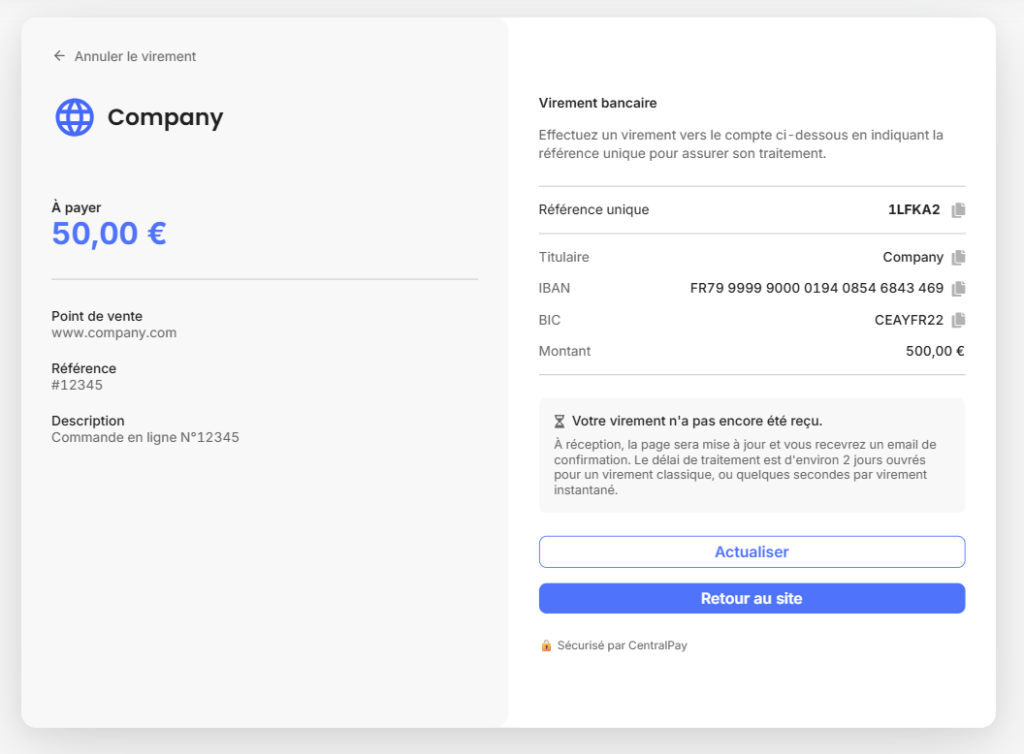
The process isn’t much longer than the map. At the checkout stage, select “bank transfer” as your payment method. The site will then display a recipient’s IBAN and an order reference number, which you should include in the transfer description.
Next, you need to log in to your online banking account (mobile app or online banking) and enter the merchant’s bank details: IBAN, amount, and description. For a standard transfer, it takes 1 to 3 business days. For an instant transfer, the funds are sent in less than 10 seconds.
The order is not confirmed until the payment has been received and processed by the merchant.
When is it useful to pay by bank transfer?
This process is particularly well-suited to several types of buyers, who sometimes prefer to make purchases using their bank account rather than their credit card.
- High transaction amounts are the most common scenario. If the amount exceeds a certain limit, your bank may block an online card payment due to spending limits or security concerns. It’s helpful to know how to pay by bank transfer in this situation: the applicable limit is generally higher for outgoing transfers than for online card payments.
- Business purchases are another natural use case. If you’re paying for an order on behalf of your company, a bank transfer offers simpler accounting tracking: it appears directly on the account statement with the description and amount, without having to go through a corporate card, which sometimes has restrictive spending limits.
Mistakes to avoid at all costs
Knowing how to pay by bank transfer also means knowing how to avoid having your order held up.
Forgetting to include the order reference or entering it incorrectly in the payment description is the most common mistake. Without this reference, the merchant cannot automatically link your payment to your order. This delays processing, sometimes by several days.
Paying an amount different from the one listed (due to rounding, a typo, omitting the cents, etc.) has the same result. The payment will fail, and your order will remain pending.
It’s also common for buyers to fail to complete the bank transfer: some select the bank transfer option on the website but then forget to actually make the transfer through their online banking. The order remains on hold indefinitely.
Best practice: Make the payment immediately after the order is confirmed, keep the payment receipt as proof, and verify that the payment description matches the merchant’s reference exactly.
What you need to know before paying by bank transfer
Before learning how to pay by bank transfer, here are a few key points to keep in mind:
The transfer is irrevocable. Once it has been processed, you cannot cancel it. For SEPA transfers, there is no automatic refund mechanism comparable to a credit card chargeback. In the event of a dispute with the merchant, it is up to the merchant to initiate the refund: your bank cannot recover the funds on your behalf.
Processing times may vary. If your bank does not offer instant transfers, or if the merchant’s bank does not support them, please allow 1 to 3 business days for your order to be processed. Please plan ahead if you have a tight delivery deadline.
Keep your proof of payment. In the event of a dispute or delay, the payment confirmation (which you can usually download from your online banking account) is your only proof that payment has been made. Keep it until you receive your order.
Instant transfers are a game-changer
European regulations now require banks in the eurozone to offer instant transfers at no extra cost. In practical terms, the processing time, the main obstacle to transfers in e-commerce, is eliminated as long as both banks involved support this standard.
How can I make an instant bank transfer on an e-commerce site? Check your banking app to see if this option is available when you make your transfer. If it is, the process is similar to paying with a credit card: you pay, and your order is confirmed immediately.
Bank transfers are still not widely used for everyday purchases in e-commerce. But for high-value orders or business transactions, they are now a reliable option, well-regulated, and increasingly fast. The next time you see this option at checkout, you’ll know exactly how to pay by bank transfer, and how to do it without making a mistake.
Are you a merchant looking to add bank transfer as a payment option to your website? Discover the CentralPay solution