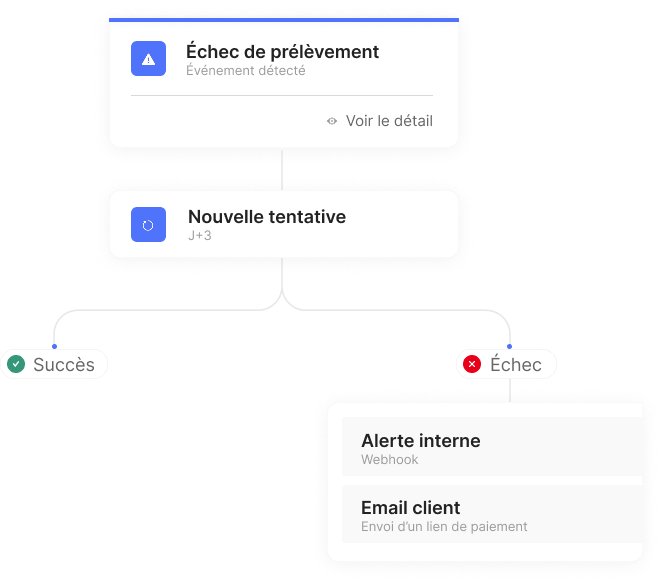
Set up automated actions linked to payments. Define the trigger, set your conditions, and schedule the action to be performed. The platform takes care of the rest.
CentralPay monitors and tracks each action to limit operational risk.
History and execution details
Each run is time-stamped, with details of the conditions evaluated and the actions triggered.
Alerts on anomalies
Any abnormal situation triggers a notification to the account administrators.
Pauses and deactivations
A workflow can be suspended or disabled at any time, without deleting the logs.
FAQs
Questions about CentralPay automation workflows?
Two approaches to integrating a payment engine: the visual builder for business teams, and the REST API for developers. Both operate on the same account and have access to the same capabilities.
Not yet. The current recommendation is to deploy the workflow on a sandbox account before activating it in production. This approach allows you to validate the behavior on real events without risk.
Yes. The conditions are based on AND/OR operators. You can simultaneously filter on the amount, customer status, error code, and any other attribute of the triggering event.
Gain efficiency without changing your business logic
Our teams analyze your architecture and offer a compliant, ready-to-deploy solution.
Avec votre consentement, nous utilisons des cookies et technologies similaires pour : assurer le bon fonctionnement du site ; mesurer l’audience ; optimiser la performance ; personnaliser la publicité et le contenu. Vous pouvez choisir de tout accepter ou de n'accepter que certains de nos cookies. Vous pouvez modifier vos préférences à tout moment.
Fonctionnel
Always active
L’accès ou le stockage technique est strictement nécessaire dans la finalité d’intérêt légitime de permettre l’utilisation d’un service spécifique explicitement demandé par l’abonné ou l’utilisateur, ou dans le seul but d’effectuer la transmission d’une communication sur un réseau de communications électroniques.
Préférences
L’accès ou le stockage technique est nécessaire dans la finalité d’intérêt légitime de stocker des préférences qui ne sont pas demandées par l’abonné ou l’internaute.
Statistiques
Le stockage ou l’accès technique qui est utilisé exclusivement à des fins statistiques.Le stockage ou l’accès technique qui est utilisé exclusivement dans des finalités statistiques anonymes. En l’absence d’une assignation à comparaître, d’une conformité volontaire de la part de votre fournisseur d’accès à internet ou d’enregistrements supplémentaires provenant d’une tierce partie, les informations stockées ou extraites à cette seule fin ne peuvent généralement pas être utilisées pour vous identifier.
Marketing
L’accès ou le stockage technique est nécessaire pour créer des profils d’internautes afin d’envoyer des publicités, ou pour suivre l’utilisateur sur un site web ou sur plusieurs sites web ayant des finalités marketing similaires.