


The payment link
designed for your performance
Send secure payment links to your customers (email, SMS or QR Code), either on an ad hoc or scheduled basis, and let them choose how to pay.
Response within 24 hours !
via email, SMS, QR code
Ad hoc or scheduled management
of mailings
payment tracking
A payment link
tailored to each sales channel
Payment link via email
Edit your email templates and integrate dynamic elements (amount, currency, reference, etc.). Schedule sending and reminder scenarios, triggered by payment deadlines and statuses.
SMS payment link
Personalize your SMS templates, integrate dynamic elements (amount, currency, reference, etc.), and turn your communications into payment opportunities.
QR Code payment link
Generate a payment link in the form of a QR code, which can be integrated into various media (invoices, reminder letters, tablets, etc.). Your customers scan it with their smartphones and then pay online.
Messaging payment link
Share your payment links via messaging apps and social networks (WhatsApp, Messenger, etc.) to easily request payment, tailored to your customers’ habits.


A simple link that handles everything for you
Automate the actions associated with the links sent
Dynamic planning
Schedule shipments according to your business rules (on order, end of month, etc.). Ideal for variable billing cycles.
Automated tracking
Automate tracking, processing, and communication tasks by assigning a letter to each payment link.
Scheduled reminders
Configure emails for failed or unpaid items. Define the scenarios that CentralPay will automatically execute.
Response within 24 hours !
FAQs
Questions about the online payment link?
A payment link is a secure link that allows a business to request a remote payment. With just a few clicks, the customer accesses an online payment page where they can pay for a purchase, invoice, or service using a bank card or another payment method.
Payment links can be sent via email, SMS, or instant messaging, or embedded in a QR code. They offer a simple solution for collecting payments without the need for an e-commerce site or a payment terminal.
Payment links are particularly well-suited for B2B companies and sales teams looking to facilitate remote payments. They provide a seamless payment experience while ensuring a high level of security for both businesses and their customers.
A payment link allows a business to collect remote payments in just a few steps. Using the CentralPay payment platform, the business generates a secure link containing transaction details, such as the amount due or the order reference.
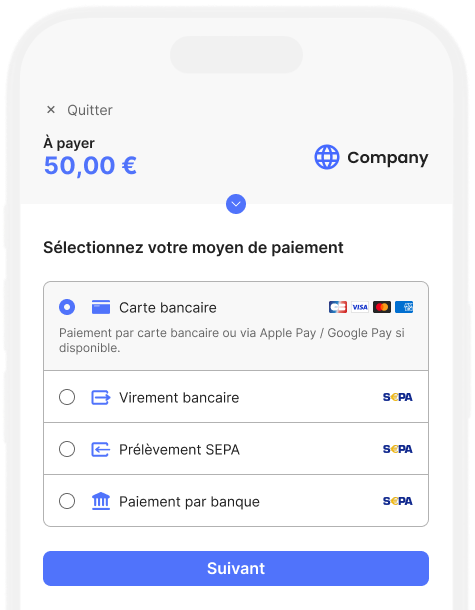
The link is then sent to the customer. By clicking the link, the customer accesses a secure payment page where they can select a payment method and confirm the transaction.
Once the payment is made, the business is notified of its status in real time.
The payment link can be customized, set with a specific validity period, and integrated with the business's management tools to automate payment tracking and transaction reconciliation.
Whether you use CentralPay services via API or via the BackOffice, simply go to the Payment Requests > Payment Links area and create a new payment request, instant or scheduled.
Then fill in the commercial information (amount, currency, reference, etc.) and contact information (name, email, telephone, etc.), then choose the authorized payment methods (credit card, bank transfer, etc.). In just a few minutes, your secure payment link is ready to be sent.
Yes, a payment link is particularly well-suited for invoice payments. It allows businesses to add a simple, secure payment method to their invoices, quotes, or payment reminders, without requiring the customer to log in to a dedicated portal or make a manual bank transfer.
With CentralPay, a payment link can be sent automatically via email or SMS as soon as an invoice is issued or a reminder is sent. The customer accesses a secure payment page directly to settle the amount due in just a few clicks, simplifying the payment process.
The CentralPay payment link helps accelerate collections, reduce late payments, and improve payment tracking.
Integrate CentralPay payment links
Our teams analyze your architecture and offer a compliant, ready-to-deploy solution.