


The online payment pagedesigned to convert
Integrate a ready-made online payment page or build your own custom form. Boost your conversions without compromising on security or customer experience.
Response within 24 hours !
payment journey
payment methods
environment
A seamless payment journey,
tailored to your brand
SmartForm
Hosted payment page
Hosted payment page
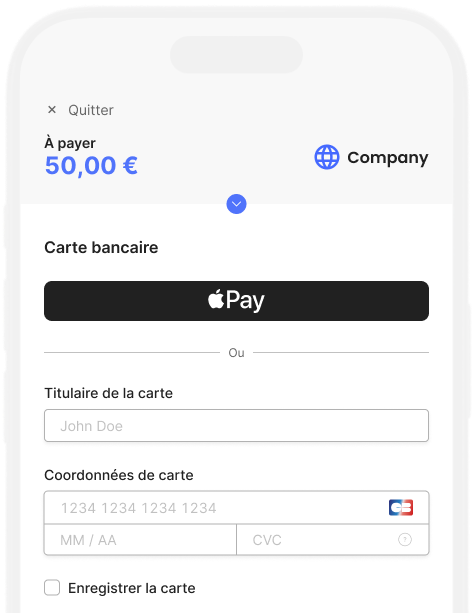
Integrate a payment page into your environment with just a few lines of code. Optimized for all devices, it opens as a pop-in or new page, then redirects the user back to your site once the payment is complete.
Customizable with your logo and colors
Responsive display for all screen sizes
Accessible via secure payment link
CustomForm
Payment page to be developed
Payment page to be developed
Develop your own payment form using our API. Customers remain within your environment, without redirection or pop-ups.
Access to all our payment services
Adapted to all payment journeys
Dedicated technical support

A unique and efficient payment experience
Everything for conversion
Reduce checkout abandonment with an adaptive payment form. Fields automatically adjust to the payment method, device, and transaction context.

Secure by nature
Rely on a form that complies with European standards and is built on secure banking connections to limit the risk of fraud and guarantee data protection.

Response within 24 hours !
FAQs
Questions about the CentralPay payment page?
All CentralPay payment methods are accessible from your online payment page. Configure them according to your payment needs, whether for one-off or recurring transactions:
- Payment methods: credit card, SCT transfer, SDD direct debit, Pay by Bank
- Payment options: subscription, installment, deposit, pre-authorization, one-click
- Channels: online, email, SMS, in-store
- Currencies: EUR, GBP, USD, CHF
Yes. The SmartForm automatically adjusts its layout for each device: mobile, tablet, and computer. Mobile wallets (Apple Pay, Google Pay) are enabled by default on compatible devices, without any additional configuration required from you.
Le formulaire SmartForm adapte dynamiquement ses champs et ses options aux paramètres de chaque transaction : moyen de paiement, montant, devise, mode récurrent ou unitaire.
Integrate CentralPay payment pages
Our teams analyze your architecture and offer a compliant, ready-to-deploy solution.
